TuxCare Extended Lifecycle Support (ELS) for PHP
Last modified: 2026 April 7
Overview
Hosting providers and server administrators routinely manage websites that run outdated PHP versions. They often delay upgrades due to cost, compatibility, or competing priorities. However, every day a website runs an outdated PHP version, it creates a security risk for every other domain on the same server.
TuxCare Extended Lifecycle Support (ELS) for PHP is the cPanel extension that solves this problem. TuxCare, a CloudLinux brand, provides custom PHP packages with ongoing security patches for outdated PHP versions. Installing this extension helps you ensure your websites stay online, secure, and fully functional until you can upgrade them to the latest PHP version. A single license covers multiple PHP versions across every domain on your server, with no per-site or per-version fees.
cPanel & WHM integrate TuxCare’s PHP packages directly into WHM’s MultiPHP Manager interface (WHM » Home » Software » MultiPHP Manager) so you can easily manage PHP versions on your server.
In this document, you will learn how TuxCare can support your PHP websites, how to purchase a license, and how to install the TuxCare cPanel extension.
- In this document, we will use the
alt-phpXXandea-phpXXpackage examples, whereXXrepresents the PHP version number. - To review all PHP versions eligible for extended lifecycle support, visit TuxCare’s CVE Tracker.
How TuxCare supports outdated PHP versions
Every PHP version eventually reaches End of Life (EOL), the point at which the PHP community stops releasing updates entirely. This means no bug fixes, no security patches, and no compatibility guarantees. Website owners who depend on an EOL PHP version face three bad options: pay to update the website, take it offline, or accept the risk.
TuxCare ELS PHP gives you a fourth option. By switching an affected domain to TuxCare’s alt-phpXX packages, you can safely keep your website running on the same PHP version and receive ongoing security patches. TuxCare uses the Common Vulnerability Scoring System (CVSS v3) to assess the severity of security vulnerabilities, and delivers patches for critical and high-severity vulnerabilities (CVSS score 7 and above) within 14 days of public disclosure. For medium-risk vulnerabilities (CVSS 4.0 to 6.9), TuxCare provides patches where mitigations are unavailable.
When to use TuxCare ELS PHP
Use TuxCare ELS PHP when:
- A domain on your server runs an EOL PHP version that you cannot yet upgrade.
- You need a verified security patch timeline to meet compliance or hosting obligations.
- Updating a legacy website to a supported PHP version falls outside your current budget or timeline.
Purchase a license
TuxCare ELS PHP is available through three access paths:
- cPanel Store — Navigate to the Extensions interface (cPanel Store » Extensions) and add TuxCare Extended Lifecycle Support for PHP to your cart.
- WHM - Navigate to WHM’s MultiPHP Manager interface (WHM » Home » Software » MultiPHP Manager) and click Buy TuxCare ELS PHP.
- Manage2 — WebPros partners can purchase a license via Manage2. Navigate to the Add License interface (Dashboard » Licenses » Add License) and enter your details.
If your license expires, you can continue using any active alt-php versions on your server, but you will not receive new security updates.
CloudLinux and Imunify360 also offer secured PHP versions. These are more complex and complete solutions for shared hosting services.
Install TuxCare ELS PHP
To install TuxCare ELS PHP, perform the following steps:
- Log in to WHM with a user that has
root-level privileges. - Navigate to WHM’s MultiPHP Manager interface (WHM » Home » Software » MultiPHP Manager).
- If your server has a valid license, the system will install TuxCare’s PHP packages when the interface loads.
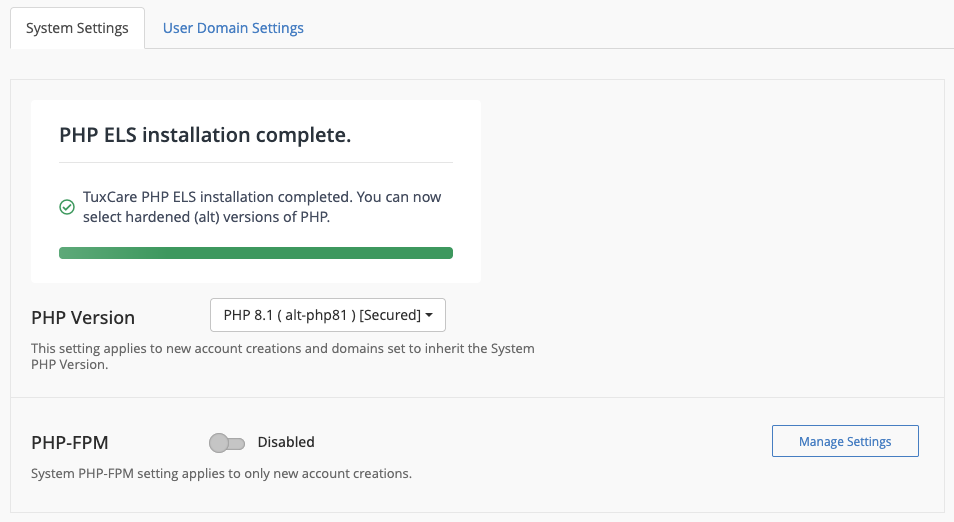
Assign and manage ELS PHP versions
Once the installation is complete, use the MultiPHP Manager interface to assign an ELS PHP version to your server or domains.
- Click the System Settings tab to configure the system-level PHP version. Existing accounts and domains will not be affected unless you set those accounts to inherit global settings.
- Click the User Domain Settings tab to configure the PHP version of a specific domain. Select the
alt-phpXXversion that matches the currentea-phpXXversion of each domain (for example, switch fromea-php74toalt-php74).
- TuxCare ELS PHP only supports
alt-phpXXversions available in WHM’s MultiPHP Manager interface (WHM » Home » Software » MultiPHP Manager). It does not support PHP versions you install directly from the OS vendor’s repository. - To configure the
php.inidirectives of your installed ELS PHP versions, use WHM’s MultiPHP INI Editor interface (WHM » Home » Software » MultiPHP INI Editor).
Scripts
You can run the following scripts from /usr/local/cpanel/scripts/ to manage PHP versions in your server:
install_tuxcare_els_php— Installs TuxCare’s PHP packages manually.show_php_settings— Returns the PHP settings for all domains on the server.mass_change_php_settings— Updates every domain that uses a specific PHP version to another PHP version.
The show_php_settings and mass_change_php_settings scripts are only available in cPanel & WHM version 136 or later.
Revert to an EasyApache PHP version
You can revert any domain to its original ea-phpXX version from WHM’s MultiPHP Manager interface. The change takes effect immediately and does not require a service restart. Any custom php.ini directives in the alt-phpXX version will not carry over to the ea-phpXX version.
Reverting to an End of Life (EOL) ea-phpXX version removes TuxCare’s security coverage and may expose servers and domains to known PHP exploits.